
Overview
Use the dashboard to review sender identity, available credits, delivery statistics and the calendar.
Platform checked: 2026-11-12 · Guide updated: 2026-11-13Steps have been checked against the live platform. Screenshots are cropped to protect account and customer data.
Before you start
- Have an activated EPOST account and its password ready.
Step-by-step instructions
- 01
Review WhiteLabel status
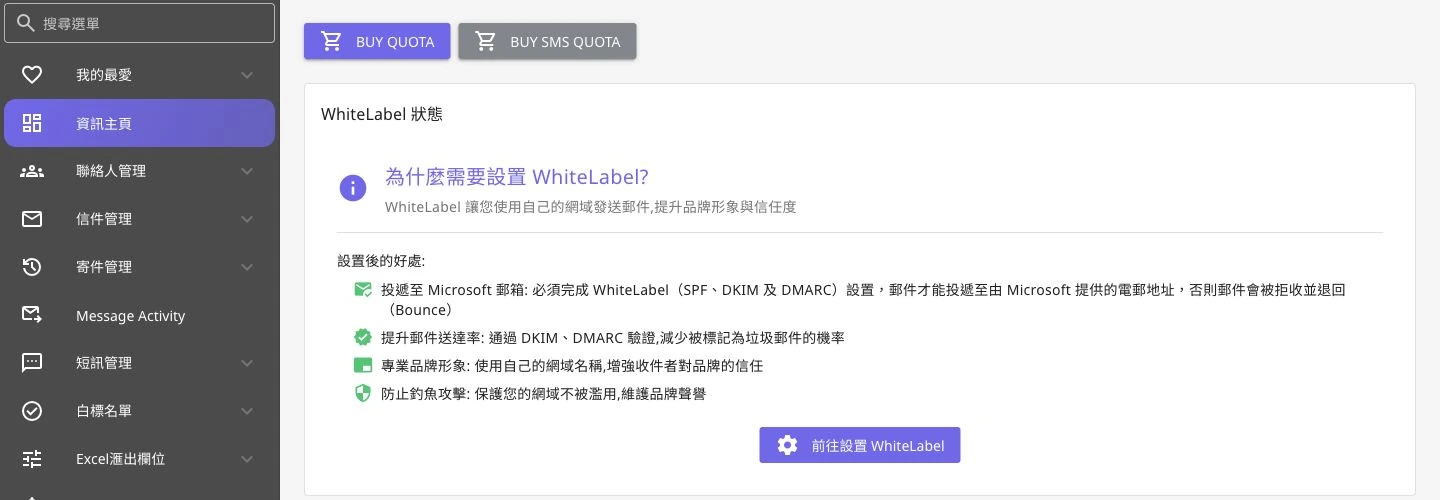
Start with the WhiteLabel status card. It explains how domain authentication relates to delivery and provides a link to WhiteLabel setup.
 Open full-size screenshot
Dashboard navigation and WhiteLabel guidance after login - 02
Check credits and expiry
Email Quota shows email credits and Expiry. SMS Quota is a separate service; do not treat SMS credits as email credits. Use BUY QUOTA only when you intend to top up.
- 03
Read the statistics
Choose a month in Monthly Statistics. DELIVERED, OPENED, UNIQUE CLICKS, TOTAL CLICKS, BOUNCED and UNSUBSCRIBED measure different things. Some geographic charts use Last 90 Days, so check each area's date range.
- 04
Continue through the calendar and navigation
Schedule Calendar offers a monthly view with previous and next month controls. Use Contact Management, Letter Management and Delivery Management to create data, and Message Activity to inspect activity.
Notes and troubleshooting
- The screenshot shows navigation and WhiteLabel guidance, without exposing account credits, contact lists or campaign performance.
Need a little more help?
Tell us what you're experiencing.